
• Error Monitoring
  • Logs
  • Session Replay
  • Tracing
  • Seer
  • Uptime Monitoring
  • Profiling
  • Cron Monitoring
  • AI Code Review
  • Github
  • Slack
  • All Integrations
  • Javascript
  • Python
  • React
  • Laravel
  • Next.js
  • All SDKs

Solutions

  • Web / Full Stack Development
  • Mobile Crash Reporting
  • Game Crash Reporting
  • AI Observability
  • Application Performance Monitoring
  • Real User Monitoring
  • Ecommerce
  • Enterprise
  • Blog
  • Changelog
  • Sandbox
  • Resources
  • Sentry Answers
  • Syntax
  • Customers
  • For Startups
  • Contact Us
  • Help Center
  • Status
  • Sentry Build
  • Events
  • Merch
Docs
Pricing
Sign InGet DemoGet Started
  • Products

    • Error Monitoring
    • LogsNEW
    • Session Replay
    • Tracing
    • SeerNEW
    • Uptime Monitoring
    • Profiling
    • Cron Monitoring
    • AI Code ReviewNEW

    Products

    • Error Monitoring
    • LogsNEW
    • Session Replay
    • Tracing
    • SeerNEW
    • Uptime Monitoring
    • Profiling
    • Cron Monitoring
    • AI Code ReviewNEW

    Integrations

    • Github
    • Slack
    • All Integrations

    Integrations

    • Github
    • Slack
    • All Integrations

    SDKs

    • Javascript
    • Python
    • React
    • Laravel
    • Next.js
    • All SDKs

    SDKs

    • Javascript
    • Python
    • React
    • Laravel
    • Next.js
    • All SDKs
  • Solutions

    • Web / Full Stack Development
    • Mobile Crash Reporting
    • Game Crash Reporting
    • AI Observability
    • Application Performance Monitoring
    • Real User Monitoring
    • Ecommerce
    • Enterprise
  • Learn

    • Blog
    • Changelog
    • Sandbox
    • Resources
    • Sentry Answers
    • Syntax
    • Customers
    • For Startups

    Learn

    • Blog
    • Changelog
    • Sandbox
    • Resources
    • Sentry Answers
    • Syntax
    • Customers
    • For Startups

    Support

    • Contact Us
    • Help Center
    • Status

    Support

    • Contact Us
    • Help Center
    • Status

    Hang out with us

    • Sentry Build
    • Events
    • Merch

    Hang out with us

    • Sentry Build
    • Events
    • Merch
    Holiday E-Commerce Checklist: A Developer’s Survival Guide

    Holiday E-Commerce Checklist: A Developer’s Survival Guide

    There’s never a good time for errors or performance degradations to show up, but during periods of peak traffic like the holidays, it’s especially critical to get immediate answers about what's failing and how to fix it.

    Learn More
  • Docs
  • Pricing
Sign InGet DemoGet Started
Sentry Changelog Illustration

Sentry Changelog

Follow Twitter@SentryChangelog to stay up to date on everything from product updates to SDK changes.

Categories:

Jump to:

User Feedback Widget is Now GA

User Feedback Widget is Now GA

Sentry automatically detects errors thrown by your application, such as performance issues and user experience problems like rage clicks. However, there are a class of problems that only your users can detect - maybe a broken link, problem with their permissions, or even something as simple as a grammatical error in copy. This is where Sentry's new and improved User Feedback widget comes in, now generally available. End-users can submit bug reports anytime with the new widget, and Sentry will then link that to available rich debugging context, including replays, errors, and tags such as URL. So now you don’t need to manually reproduce the error yourself, get on a call with a customer, or decode a support ticket.
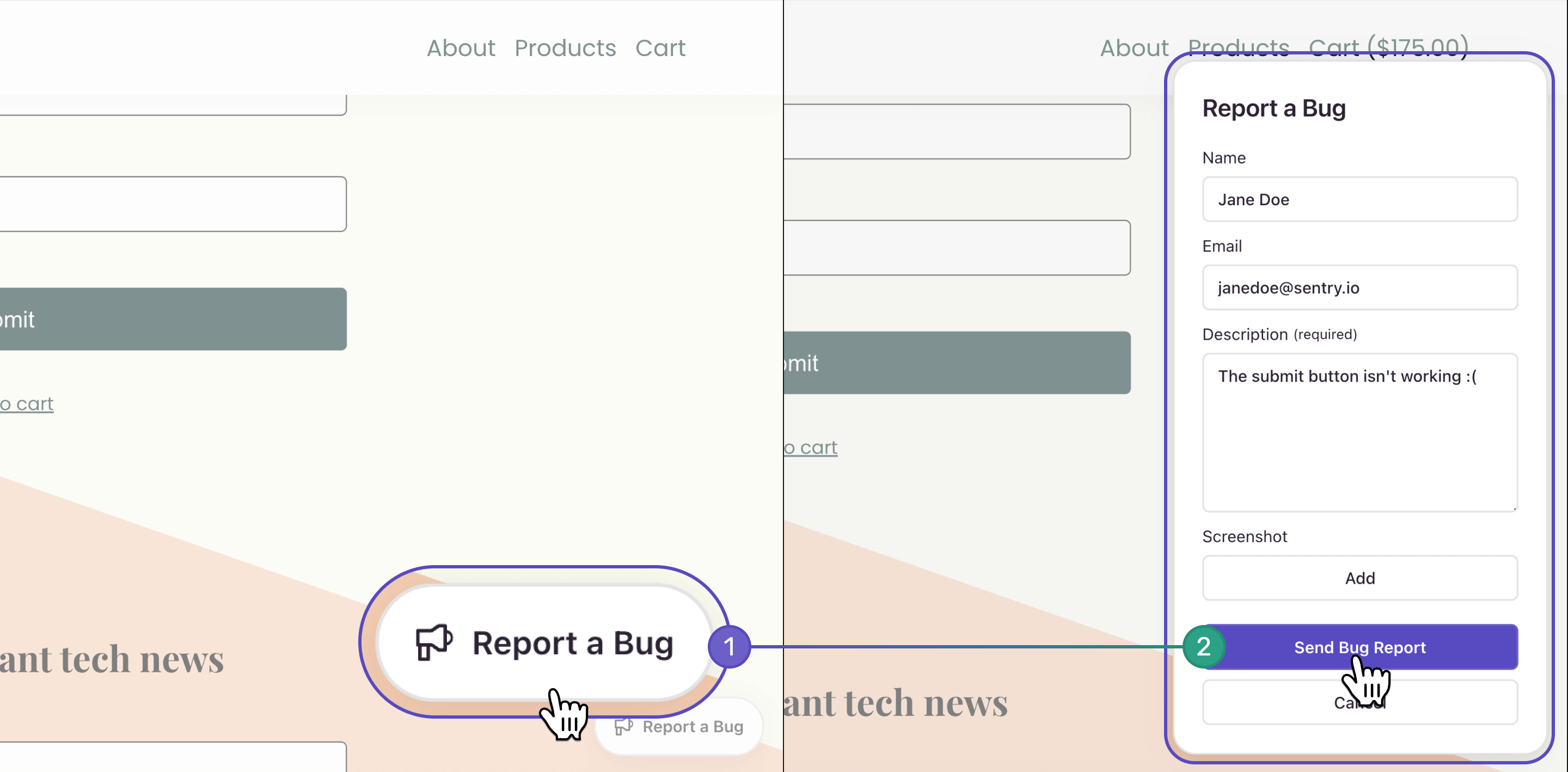
docs-user-feedback-1.png

To set up the new User Feedback widget, add the Feedback integration to your Sentry.init call:

Sentry.init({
  dsn: "__DSN__",
  integrations: [
     Sentry.feedbackIntegration({
      // Additional SDK configuration goes in here
      colorScheme: 'system',
     }),
  ],
});

For further customization of the widget, please see our documentation. A prerequisite to installing the widget is a browser JavaScript SDK (or related framework) version of 7.85.0 or higher.

Once you have enabled the User Feedback widget, make sure you set up alerts so you don't miss any submissions from your users.

To learn more, check out our blog post: Introducing the User Feedback Widget– The easiest way to connect with your users.

Please share any feedback or questions you have in GitHub or drop us a line in Discord.

May 9, 2024
Your code is broken. Let's Fix it.
Get Started