• Error Monitoring
  • Logs
  • Session Replay
  • Tracing
  • Seer
  • Uptime Monitoring
  • Profiling
  • Cron Monitoring
  • AI Code Review
  • Github
  • Slack
  • All Integrations
  • Javascript
  • Python
  • React
  • Laravel
  • Next.js
  • All SDKs

Solutions

  • Web / Full Stack Development
  • Mobile Crash Reporting
  • Game Crash Reporting
  • AI Observability
  • Application Performance Monitoring
  • Real User Monitoring
  • Ecommerce
  • Enterprise
  • Blog
  • Changelog
  • Sandbox
  • Resources
  • Sentry Answers
  • Syntax
  • Customers
  • For Startups
  • Contact Us
  • Help Center
  • Status
  • Sentry Build
  • Events
  • Merch
Docs
Pricing
Sign InGet DemoGet Started
  • Products

    • Error Monitoring
    • LogsNEW
    • Session Replay
    • Tracing
    • SeerNEW
    • Uptime Monitoring
    • Profiling
    • Cron Monitoring
    • AI Code ReviewNEW

    Products

    • Error Monitoring
    • LogsNEW
    • Session Replay
    • Tracing
    • SeerNEW
    • Uptime Monitoring
    • Profiling
    • Cron Monitoring
    • AI Code ReviewNEW

    Integrations

    • Github
    • Slack
    • All Integrations

    Integrations

    • Github
    • Slack
    • All Integrations

    SDKs

    • Javascript
    • Python
    • React
    • Laravel
    • Next.js
    • All SDKs

    SDKs

    • Javascript
    • Python
    • React
    • Laravel
    • Next.js
    • All SDKs
  • Solutions

    • Web / Full Stack Development
    • Mobile Crash Reporting
    • Game Crash Reporting
    • AI Observability
    • Application Performance Monitoring
    • Real User Monitoring
    • Ecommerce
    • Enterprise
  • Learn

    • Blog
    • Changelog
    • Sandbox
    • Resources
    • Sentry Answers
    • Syntax
    • Customers
    • For Startups

    Learn

    • Blog
    • Changelog
    • Sandbox
    • Resources
    • Sentry Answers
    • Syntax
    • Customers
    • For Startups

    Support

    • Contact Us
    • Help Center
    • Status

    Support

    • Contact Us
    • Help Center
    • Status

    Hang out with us

    • Sentry Build
    • Events
    • Merch

    Hang out with us

    • Sentry Build
    • Events
    • Merch
    Holiday E-Commerce Checklist: A Developer’s Survival Guide

    Holiday E-Commerce Checklist: A Developer’s Survival Guide

    There’s never a good time for errors or performance degradations to show up, but during periods of peak traffic like the holidays, it’s especially critical to get immediate answers about what's failing and how to fix it.

    Learn More
  • Docs
  • Pricing
Sign InGet DemoGet Started
Sentry Changelog Illustration

Sentry Changelog

Follow Twitter@SentryChangelog to stay up to date on everything from product updates to SDK changes.

Categories:

Jump to:

Rage Click Issues - General Availability Release

Rage Click Issues - General Availability Release

Are users smashing buttons on your site expecting something to happen? Now you can get alerted to rage clicks within Sentry to take action on them as soon as they occur. With rage click issues, you can get all the handy workflow components that come with Sentry issues to triage your rage clicks (i.e., resolve, assign, archive, etc.) as well as the debugging context needed to resolve them.
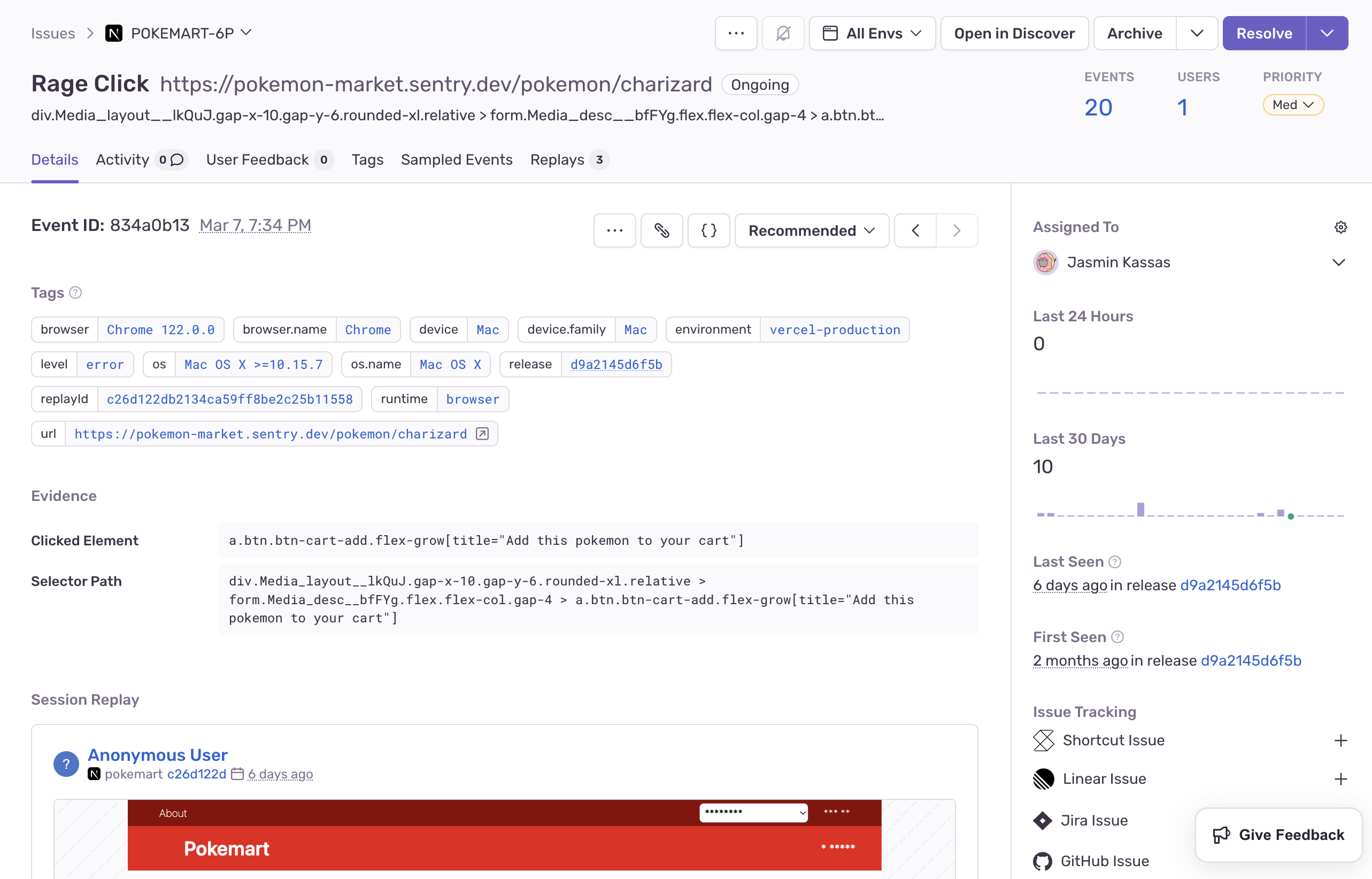
Screenshot 2024-03-13 at 3.12.01 PM.png

📝 Bookmark this link to see a complete list of rage click issues as they come in.

These are the prerequisites to create rage click issues for your organization:

  1. Your organization needs to have sent replay events
  2. JavaScript SDK (or related framework) version of 7.60.1 or higher

If you have the default project alert set up (titled "Send a notification for new issues"), you will receive rage click alerts. If you don't, follow these steps to get alerted:

  1. Create a New Alert Rule in Sentry
  2. Scroll to the "Set conditions" section and set the "IF" filter to The issue's category is equal to… "Replay"
  3. Choose which actions to perform in the “THEN” filter
  4. Add an alert name and owner

To turn off rage click issues, go to your Settings > Projects > Select relevant project > Replays (Under "Processing" heading) > Toggle off "Create Rage Click Issues".

Please share any feedback you have and report bugs by opening by an issue .

March 13, 2024
Your code is broken. Let's Fix it.
Get Started